
- Home
- PERIPHERALS
- Monitors
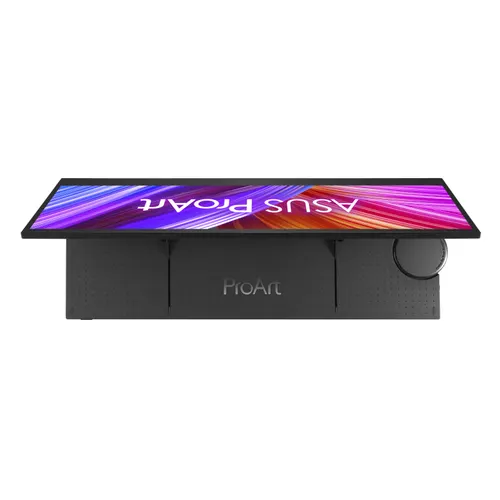
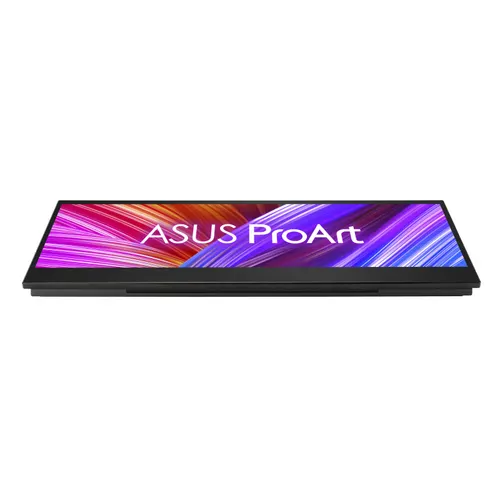
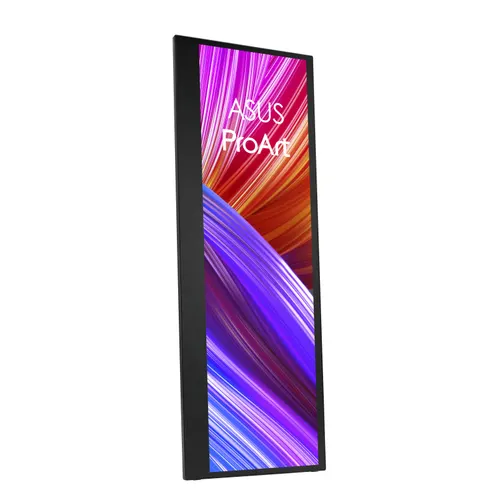
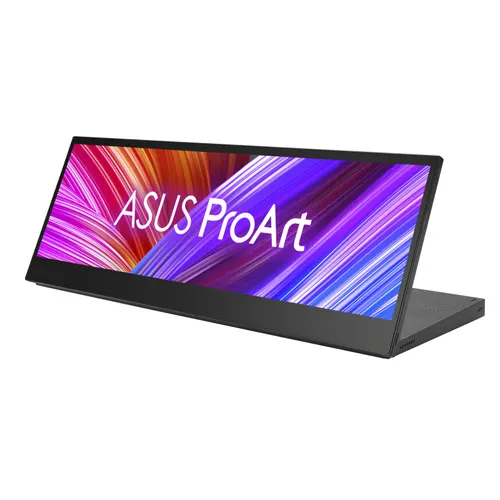
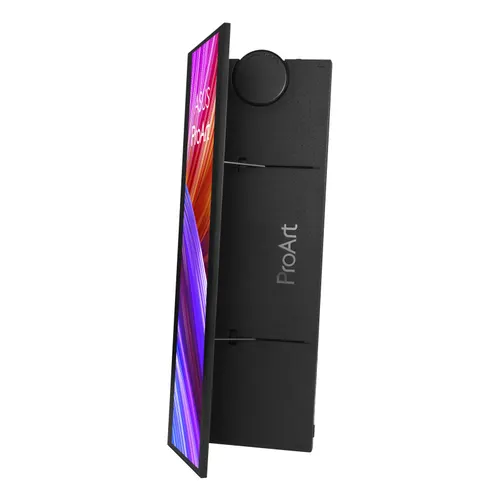
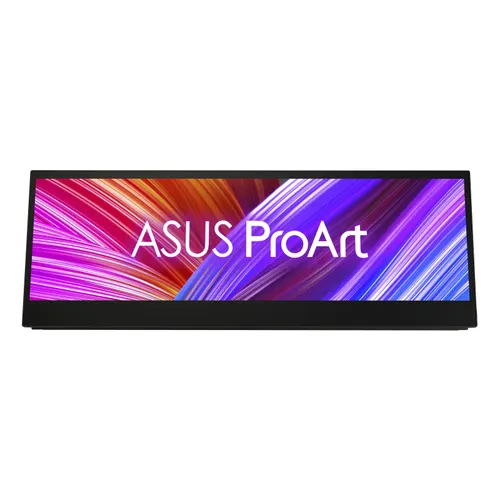
- ASUS ProArt PA147CDV computer monitor 35.6 cm (14") 1920 x 550 pixels LCD Touchscreen Black
ASUS ProArt PA147CDV computer monitor 35.6 cm (14") 1920 x 550 pixels LCD Touchscreen Black
- Code
- 792.517.350
- MPN
- 90LM0720-B01170
- Brand
- Asus
- 14-inch, 32:9 Full HD (1920 x 550) IPS panel with 10-point multitouch and Microsoft Pen Protocol 2.0 support
- Calman Verified and factory calibrated to Delta E < 2 for exceptional color accuracy, with 100% sRGB and 100% Rec. 709 coverage
- ASUS Dial and Control Panel provide shortcuts in supported Adobe creative software
- Patented mechanical kickstand design folds out smoothly and props the display up in portrait or landscape orientation to fit different creator’s scenario
- Includes one standard HDMI® and two USB Type-C® (DP Alt mode) ports for variety devices connection
- ASUS Eye Care monitors feature TÜV Rheinland-certified Flicker-free and Low Blue Light technologies to ensure a comfortable viewing experience
Larger quantity or a project?
Send an enquiry and our sales team will send you a quotation with project pricing.
Product description
ASUS ProArt PA147CDV 35.6cm (32:9) FHD HDMI
ProArt Display PA147CDV Creative Tool
Dial up Your Creative Flow
ProArt Display PA147CDV is a 14-inch creative tool with a 32:9 aspect ratio. Built to empower creators and streamline creative workflows inside the studio or out on location, it features the intuitive ASUS Dial, customizable Control Panel, 10-point multitouch controls, and Microsoft Pen Protocol 2.0 (MPP 2.0) support. PA147CDV is Calman Verified and factory calibrated to Delta E < 2, and it covers 100% of sRGB and Rec. 709 color spaces for exceptional color. Aesthetically, PA147CDV looks the part, too – winning the 2021 Good Design and 2021 Computex d&i Gold awards.
Built for Creators
Streamline Your Workflow
The customizable Control Panel puts the tools and functions you need front and center, allowing you to make adjustments quickly for a more efficient workflow. For easier multitasking, you can even use split-screen mode to show shortcuts for different apps side by side.
Ready for that Creative Spark
With ProArt Display PA147CDV, you’re always ready when an idea comes. Take notes or sketch on the go with a stylus, or hook it up to your laptop with just a single cable.
Natural Writing or Drawing
With MPP 2.0 support, you’re able to use a pen or stylus to jot down or sketch ideas whenever inspiration strikes*.
*ASUS Pen or stylus not included.
Creativity with a Spin
ASUS Dial works with Photoshop, Photoshop Lightroom Classic, Premiere Pro and After Effects Classic for shortcuts access
ASUS Dial is designed to work with compatible Adobe software* such as Photoshop, Photoshop Lightroom Classic, Premiere Pro and After Effects**. Customized shortcuts enable you to zoom in and out of images or adjust brush size by simply turning the ASUS Dial. You can even tailor the default interface to suit your own work style.
Intuitive Control at Your Fingertips
Control Panel provides an intuitive interface that’s unique to each supported Adobe software*. The 10-point multitouch functionality** of PA147CDV means you can quickly reach out and switch tools, turn a dial to get the exact color you’re looking for, or adjust a key parameter for the tool you’re using – it’s all neatly laid out so you can work more efficiently.
Experience Full Color
Wide Color Gamut
Color Accuracy
Wide 100% sRGB and 100% Rec. 709 color gamut offers more vivid colors, ensuring deeper primary colors like red, green and blue, and richer secondary colors.
Pre-Calibrated for
Out-of-the-Box Accuracy
Color professionals rely on color-accurate displays to ensure that their creations render as intended. PA147CDV is pre-calibrated at the factory and Calman Verified to guarantee industry-leading color accuracy. Every ProArt display undergoes meticulous testing to ensure smooth color gradation and to guarantee the very best visuals.
Quick Color Gamut Adjustment
ASUS-exclusive ProArt Preset provides multiple modes for quick color-gamut adjustment. Whether you're grading colors, editing videos or manipulating photos, you can switch and match your needs easily.
Rich Connectivity
PA147CDV offers a host of ports to cater to your creative needs. Two USB-C ports deliver video and power input over a single cable, with additional flexibility offered by the HDMI port for a connection to various input sources.
*Connected device requires USB Type-C (DisplayPort Alt Mode and at least 10W power output.)
Create in Comfort
Built-in Adjustable Kickstand
Caring for Your Eyes
PA147CDV has a multi-award winning design that bagged the 2021 Good Design and Computex d&I Gold awards. Its patented mechanical kickstand lets you adjust the display to the perfect angle. Lay PA147CDV flat on the desk to do some sketching, or tilt it up to an almost-vertical position to track the timeline in your video editing app. Simply set the right tilt angle to suit the task at hand.
Free 3 Months of Adobe Creative Cloud
Get complimentary membership with the purchase of selected ASUS products.* (Up to a $238.47 value)
Dial up Your Creative Flow
ProArt Display PA147CDV is a 14-inch creative tool with a 32:9 aspect ratio. Built to empower creators and streamline creative workflows inside the studio or out on location, it features the intuitive ASUS Dial, customizable Control Panel, 10-point multitouch controls, and Microsoft Pen Protocol 2.0 (MPP 2.0) support. PA147CDV is Calman Verified and factory calibrated to Delta E < 2, and it covers 100% of sRGB and Rec. 709 color spaces for exceptional color. Aesthetically, PA147CDV looks the part, too – winning the 2021 Good Design and 2021 Computex d&i Gold awards.
Built for Creators
Streamline Your Workflow
The customizable Control Panel puts the tools and functions you need front and center, allowing you to make adjustments quickly for a more efficient workflow. For easier multitasking, you can even use split-screen mode to show shortcuts for different apps side by side.
Ready for that Creative Spark
With ProArt Display PA147CDV, you’re always ready when an idea comes. Take notes or sketch on the go with a stylus, or hook it up to your laptop with just a single cable.
Natural Writing or Drawing
With MPP 2.0 support, you’re able to use a pen or stylus to jot down or sketch ideas whenever inspiration strikes*.
*ASUS Pen or stylus not included.
Creativity with a Spin
ASUS Dial works with Photoshop, Photoshop Lightroom Classic, Premiere Pro and After Effects Classic for shortcuts access
ASUS Dial is designed to work with compatible Adobe software* such as Photoshop, Photoshop Lightroom Classic, Premiere Pro and After Effects**. Customized shortcuts enable you to zoom in and out of images or adjust brush size by simply turning the ASUS Dial. You can even tailor the default interface to suit your own work style.
Intuitive Control at Your Fingertips
Control Panel provides an intuitive interface that’s unique to each supported Adobe software*. The 10-point multitouch functionality** of PA147CDV means you can quickly reach out and switch tools, turn a dial to get the exact color you’re looking for, or adjust a key parameter for the tool you’re using – it’s all neatly laid out so you can work more efficiently.
Experience Full Color
Wide Color Gamut
Color Accuracy
Wide 100% sRGB and 100% Rec. 709 color gamut offers more vivid colors, ensuring deeper primary colors like red, green and blue, and richer secondary colors.
Pre-Calibrated for
Out-of-the-Box Accuracy
Color professionals rely on color-accurate displays to ensure that their creations render as intended. PA147CDV is pre-calibrated at the factory and Calman Verified to guarantee industry-leading color accuracy. Every ProArt display undergoes meticulous testing to ensure smooth color gradation and to guarantee the very best visuals.
Quick Color Gamut Adjustment
ASUS-exclusive ProArt Preset provides multiple modes for quick color-gamut adjustment. Whether you're grading colors, editing videos or manipulating photos, you can switch and match your needs easily.
Rich Connectivity
PA147CDV offers a host of ports to cater to your creative needs. Two USB-C ports deliver video and power input over a single cable, with additional flexibility offered by the HDMI port for a connection to various input sources.
*Connected device requires USB Type-C (DisplayPort Alt Mode and at least 10W power output.)
Create in Comfort
Built-in Adjustable Kickstand
Caring for Your Eyes
PA147CDV has a multi-award winning design that bagged the 2021 Good Design and Computex d&I Gold awards. Its patented mechanical kickstand lets you adjust the display to the perfect angle. Lay PA147CDV flat on the desk to do some sketching, or tilt it up to an almost-vertical position to track the timeline in your video editing app. Simply set the right tilt angle to suit the task at hand.
Free 3 Months of Adobe Creative Cloud
Get complimentary membership with the purchase of selected ASUS products.* (Up to a $238.47 value)
Specifications
| Display | |
|---|---|
| Display diagonal | 35.6 cm (14") |
| Display resolution | 1920 x 550 pixels |
| Native aspect ratio | 32:9 |
| Display technology | LCD |
| Panel type | IPS |
| Backlight type | LED |
| Touchscreen | Yes |
| Display brightness (typical) | 400 cd/m² |
| Response time | 5 ms |
| Display surface | Matt |
| Anti-glare screen | Yes |
| Screen shape | Flat |
| Contrast ratio (typical) | 1200:1 |
| Maximum refresh rate | 60 Hz |
| Viewing angle, horizontal | 178° |
| Viewing angle, vertical | 178° |
| Display number of colours | 16.7 million colours |
| Pixel pitch | 0.179 x 0.179 mm |
| Pixel density | 143 ppi |
| Viewable size, horizontal | 34.4 cm |
| Viewable size, vertical | 9.86 cm |
| Digital horizontal frequency | 24 - 83 kHz |
| Digital vertical frequency | 23 - 60 Hz |
| Colour gamut standard | DCI-P3 |
| sRGB coverage (typical) | 100% |
| Performance | |
|---|---|
| Flicker-free technology | Yes |
| Low Blue Light technology | Yes |
| Multimedia | |
|---|---|
| Number of speakers | 2 |
| RMS rated power | 2 W |
| Built-in speaker(s) | Yes |
| Built-in camera | No |
| Design | |
|---|---|
| Market positioning | Graphics design |
| Product colour | Black |
| Ports & interfaces | |
|---|---|
| Built-in USB hub | No |
| USB Type-C downstream ports quantity | 2 |
| USB Type-C DisplayPort Alternate Mode | Yes |
| HDMI | Yes |
| HDMI ports quantity | 1 |
| HDMI version | 1.4 |
| Headphone out | No |
| HDCP | Yes |
| HDCP version | 1.4 |
| Ergonomics | |
|---|---|
| Pivot | Yes |
| Pivot angle | 0 - 90° |
| Tilt adjustment | Yes |
| Tilt angle range | 25 - 70° |
| Power | |
|---|---|
| Energy efficiency class (SDR) | E |
| Energy efficiency class (HDR) | Not available |
| Energy consumption (SDR) per 1000 hours | 9 kWh |
| Power consumption (typical) | 10 W |
| Power consumption (standby) | 0.5 W |
| Power consumption (off) | 0.3 W |
| Power consumption (PowerSave) | 0.5 W |
| AC input voltage | 100 - 240 V |
| AC input frequency | 50 - 60 Hz |
| Power supply type | External |
| Energy efficiency scale | A to G |
| Weight & dimensions | |
|---|---|
| Width (with stand) | 357.2 mm |
| Depth (with stand) | 20.7 mm |
| Height (with stand) | 127.7 mm |
| Weight (with stand) | 950 g |
| Packaging data | |
|---|---|
| Package width | 440 mm |
| Package depth | 92 mm |
| Package height | 290 mm |
| Package weight | 2.3 kg |
| Package type | Box |
| Technical details | |
|---|---|
| Native refresh rate | 60 Hz |

Documents
Recommended accessories
Manhattan
Manhattan Wall Mount for TV & Monitors (Spring Arm 3 pivots), For screens 17" to 32", VESA compatibility: 75x75mm and 100x100mm - check the dimensions of the four mounting holes on back of screen to ensure it fits, Max
40,50 €
Manhattan
Manhattan Dual Desk Mount for TV & Monitors (Full Motion Gas Spring), For screens 10" to 27", Clamp or Grommet Assembly, VESA compatibility: 75x75 and 100x100mm - check the dimensions of the four mounting holes on back
77,62 €
Manhattan
Manhattan Desk Mount for TV & Monitors, Stand Assembly, Tilt/Swivel/Rotation, For screens 10" to 27", VESA compatibility: 75x75 and 100x100mm - check the dimensions of the four mounting holes on back of screen to ensure
18,00 €
Platinet/Omega HDMI kabel 1.4 4K, 1,5m, OCHB41
1,57 €
Manhattan
Manhattan HDMI 4K@30Hz Cable, 1m, Suitable for ALL 1080p/HD and Majority of 4K Uses (Check Your System 4K Specification to Be Sure), Black, High Speed, Lifetime Warranty, Equivalent to HDMM1M
3,82 €
Manhattan
Manhattan HDMI 4K@30Hz Cable, 1.8m, Suitable for ALL 1080p/HD and Majority of 4K Uses (Check Your System 4K Specification to Be Sure), Black, High Speed, Lifetime Warranty, Equivalent to HDMM6
4,39 €
STANDARD DisplayPort kabel, M/M, 2.0m, crni
4,21 €
Roline
Roline VALUE adapter DisplayPort - DisplayPort, F/F
2,67 €
Asus
ASUS ROG Keris II Ace Wireless AimPoint White mouse Gaming Right-hand RF Wireless + Bluetooth + USB Type-A Optical 42000 DPI
171,14 €
Asus
ASUS ROG Strix Morph 96 keyboard Gaming USB + RF Wireless + Bluetooth QWERTZ German Black
131,14 €
Logitech
Webcam Logitech C922 Pro Stream, USB
101,09 €
Logitech
Webcam Logitech Brio 100, Off-White, USB
41,74 €
More from Monitors
All in category →Asus in our range
All Asus products →Asus
ASUS ExpertCenter P400 AiO P440VAK-WPC176X Intel Core 5 210H 60.5 cm (23.8") 1920 x 1080 pixels All-in-One PC 16 GB DDR5-SDRAM 512 GB SSD Windows 11 Pro Wi-Fi 6 (802.11ax) White
1.086,08 €
Asus
ASUS ROG SLASH Edition 20 backpack Roll top backpack Black Polyester, PU leather
129,18 €
Asus
ASUS AC1600 Carry Bag 40.6 cm (16") Messenger case Grey, Almond
15,76 €
Asus
ASUS Vivobook 16 F1605VA-WS74 Intel® Core™ i7 i7-1355U Laptop 40.6 cm (16") WUXGA 16 GB DDR4-SDRAM 512 GB SSD Wi-Fi 6E (802.11ax) Windows 11 Home Black
888,99 €
Asus
ASUS ROG PHONE BAG Preto Black Unisex Cross body bag
9,99 €
Asus
ASUS Vivobook 16 X1605VA-OLED-ISSSH220W Intel Core 9 270H Laptop 40.6 cm (16") Full HD 16 GB DDR5-SDRAM 512 GB SSD Wi-Fi 6 (802.11ax) Windows 11 Home Black
1.227,70 €