
- Home
- PERIPHERALS
- Monitors
- EIZO FlexScan EV2795-BK computer monitor 68.6 cm (27") 2560 x 1440 pixels Quad HD LCD Black
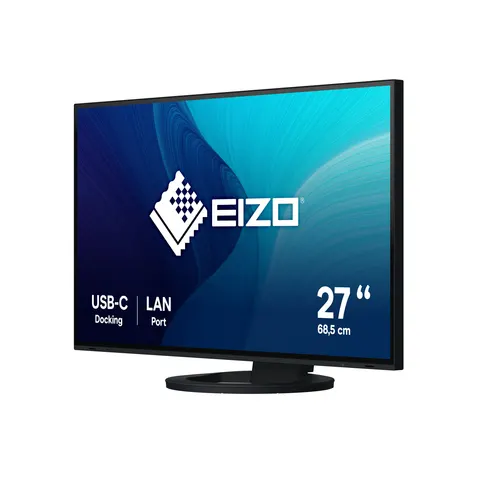
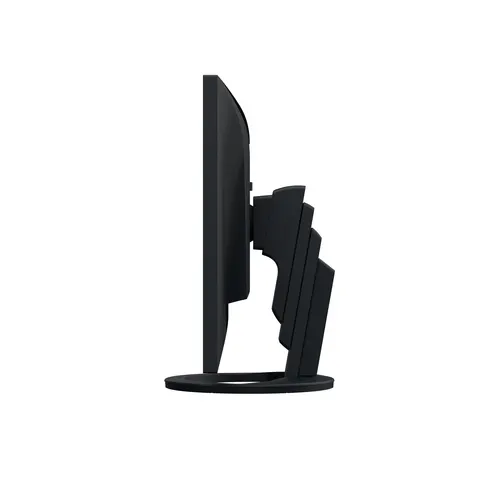
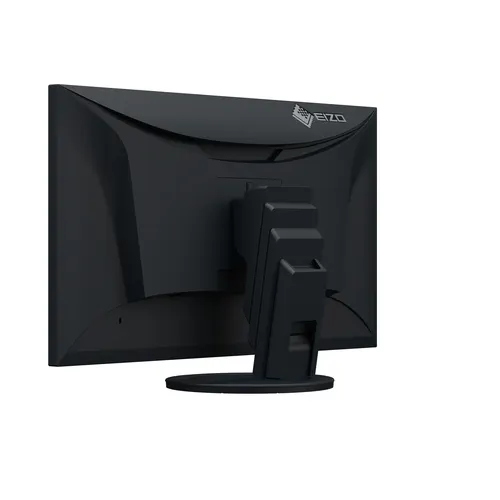
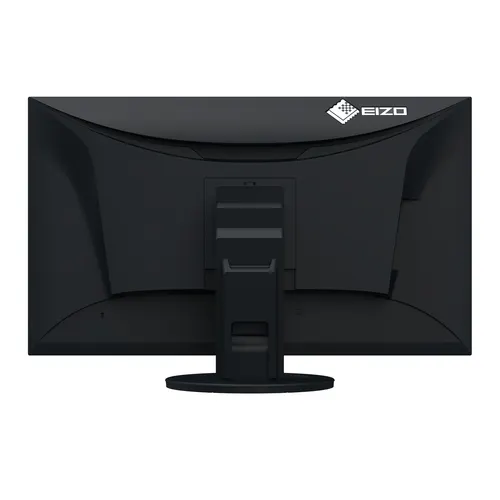
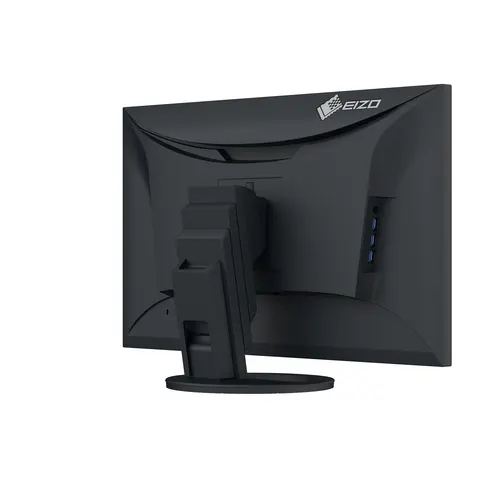
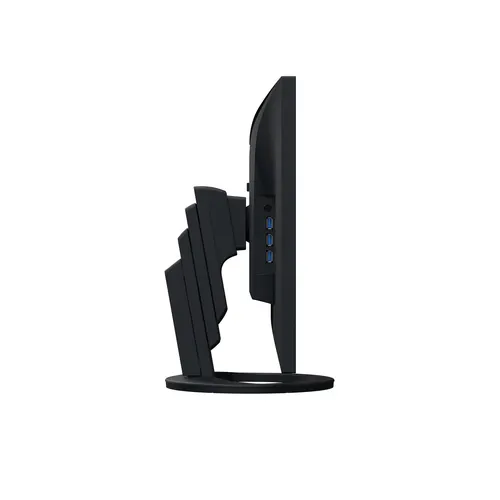
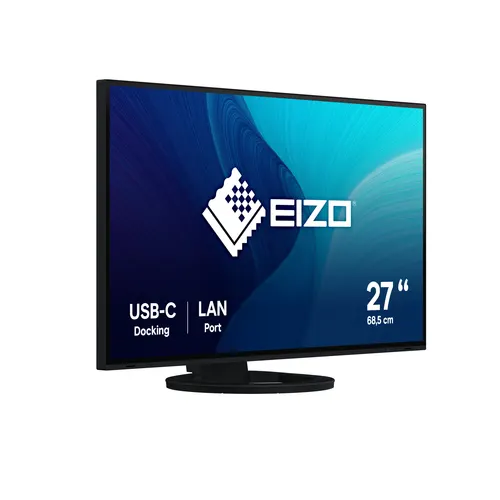
EIZO FlexScan EV2795-BK computer monitor 68.6 cm (27") 2560 x 1440 pixels Quad HD LCD Black
- Code
- 853.076.323
- MPN
- EV2795-BK
- Brand
- EIZO
- Warranty
- 60 mo.
Larger quantity or a project?
Send an enquiry and our sales team will send you a quotation with project pricing.
Product description
EV2795 FlexScan
Idealno rješenje za modernu radnu stanicu: zahvaljujući USB-C priključcima i USB-C daisy chain funkciji, EV2795 ne zahtijeva složeno kabliranje i ističe se gotovo bezokvirnim dizajnom.
Veličina zaslona: 68,5 cm (27")
Rezolucija: 2560 x 1440
Omjer slike: 16:9
Dostupne boje: Crna ili bijela
________________________________________
Povezivost – Najbolja povezivost u klasi
Jednostavno povezivanje putem USB-C
Jedan USB-C kabel omogućuje:
• Prijenos video i audio signala
• Mrežnu povezanost
• Napajanje do 70 W
EV2795 može poslužiti kao centralna docking stanica za povezivanje prijenosnog računala, što je idealno za rad u uredu i kod kuće.
________________________________________
Daisy Chain metoda – Efikasno rješenje za više zaslona
Monitor omogućuje povezivanje više ekrana putem jednog kabela koristeći USB-C daisy chain metodu. Na ovaj način mogu se povezati do dva monitora, čime se smanjuje nered s kablovima i poboljšava radna učinkovitost.
Ako koristite računala i monitore s DisplayPort priključkom, možete ih povezati s USB-C pomoću CP200 kabela.
________________________________________
Stabilna mrežna veza – Integrirani LAN priključak
Monitor ima dedicirani LAN port, omogućujući stabilnu žičanu mrežnu povezanost čak i na prijenosnim računalima koja nemaju LAN priključak. Ovo je korisno za video konferencije i sigurnu podatkovnu komunikaciju.
Opcionalni softver "EIZO MAC Address Clone Utility" omogućuje privremenu dodjelu MAC adrese računala monitoru radi veće mrežne sigurnosti.
________________________________________
KVM prekidač – Jedan miš i tipkovnica za dva računala
EV2795 ima integrirani KVM prekidač, omogućujući upravljanje dvama računalima s istom tipkovnicom i mišem. Monitor automatski prepoznaje aktivni uređaj i prebacuje povezanost.
________________________________________
Kvaliteta slike
Precizan, svijetao i kontrastan prikaz
EV2795 koristi IPS panel s 2560 x 1440 rezolucijom, 1000:1 kontrastom i svjetlinom do 350 cd/m². Rezultat je oštra slika, jasni tekstovi i stabilni prikaz boja iz bilo kojeg kuta gledanja.
________________________________________
Precizna kontrola boja
Monitor koristi 10-bitnu Look-Up Table (LUT) tehnologiju, omogućujući preciznije nijanse boja u usporedbi s klasičnim 8-bitnim LUT-ovima.
• Prilagodba balansa bijele boje od 4000 K do 10 000 K u koracima od 500 K.
• Savršeni prijelazi boja osiguravaju realističan prikaz bez preeksponiranja tonova.
________________________________________
Brze promjene slike s Overdrive funkcijom
Overdrive tehnologija smanjuje vrijeme odziva na 5 ms, omogućujući brzo osvježavanje slike bez zamućenja.
________________________________________
Dizajn – Elegantan izgled
Minimalistički dizajn
EV2795 dolazi u gotovo bezokvirnom dizajnu, koji omogućuje skladno uklapanje u uredske i kućne prostore.
Dostupan u crnoj i bijeloj boji, s odgovarajućim bijelim kabelima.
________________________________________
Ergonomija – Udobnost i zaštita očiju
Auto EcoView – Automatska prilagodba svjetline
Monitor koristi senzor osvjetljenja koji prilagođava svjetlinu zaslona prema ambijentalnom svjetlu. Prednosti:
• Smanjuje odsjaj i umor očiju
• Štedi energiju do 50%
Također, EcoView Index omogućuje ručno podešavanje postavki za ekonomičniji rad.
________________________________________
Bez treperenja i smanjen plavi spektar
Monitor koristi hibridnu PWM/DC tehnologiju koja eliminira treperenje i omogućuje ugodnije gledanje bez naprezanja očiju.
TÜV Rheinland certifikat potvrđuje nisku emisiju plavog svjetla i rad bez treperenja.
________________________________________
Premaz protiv odsjaja
Smanjuje refleksiju svjetla, poboljšavajući vidljivost u svijetlim prostorima.
________________________________________
Ergonomski stalak
• Podesiva visina: 176,6 mm
• Nagib: 5° naprijed / 35° unatrag
• Zakretanje: 344°
• Rotacija: U smjeru i suprotno od kazaljke na satu
________________________________________
Softver i jednostavnost korištenja
Automatsko podešavanje boja
Unaprijed postavljeni režimi optimiziraju svjetlinu, gamma korekciju i temperaturu boje za različite vrste sadržaja.
• Paper mode: Simulira izgled papira, smanjujući naprezanje očiju pri čitanju.
________________________________________
Jednostavno upravljanje
Elektrostatičke tipke omogućuju intuitivno podešavanje postavki, uz Vodič za tipke koji prikazuje funkcije pri dodiru upravljačke ploče.
________________________________________
Monitor upravljanje i administracija
Screen InStyle softver omogućuje podešavanje boja, uštedu energije i ergonomiju, uz sinkronizaciju postavki na više monitora.
Screen InStyle Server omogućuje centralizirano upravljanje monitorima u mreži.
Monitor Configurator olakšava masovnu konfiguraciju postavki monitora putem mreže.
________________________________________
Ekološka održivost
Energetski učinkovita tehnologija
• Auto EcoView i EcoView Optimizer automatski smanjuju potrošnju energije do 50%.
• Mehanički prekidač za napajanje omogućuje potpuno isključivanje uređaja, eliminirajući potrošnju energije u stanju mirovanja.
________________________________________
Održiva proizvodnja
• Smanjena upotreba hlapljivih organskih spojeva (VOCs) u materijalima.
• Ekološko pakiranje od recikliranih materijala umjesto plastike.
________________________________________
Optimizirano kolektivno pakiranje
EIZO nudi pakiranje s više monitora u jednom paketu, smanjujući otpad i emisije CO₂ tijekom transporta.
________________________________________
Certifikati i standardi
Certifikati: TCO Certified Generation 10, ENERGY STAR, EPEAT Gold, RoHS, TÜV/Ergonomics, TÜV/Low Blue Light, TÜV/Flicker Free.
________________________________________
Jamstvo
5-godišnje jamstvo, omogućeno naprednim tehnologijama i kvalitetnim materijalima.
Zero pixel defects jamstvo osigurava da monitor nema potpuno osvijetljenih pod-piksela u prvih šest mjeseci od kupnje.
Tehničke specifikacije
Općenito
Broj artikla: EV2795-BK
Boja kućišta: Crno ili bijelo
Područja primjene: Ured
Linija proizvoda: FlexScan
Područja primjene: Velike i srednje tvrtke, privatni korisnici i mali biznisi, kućni ured, CAD, financije, kontrolne sobe, administracija u bolnicama
Posebni zahtjevi sustava: Nema, kompatibilan s većinom računala i operativnih sustava, uključujući macOS i Windows
EAN: 4995047056638
________________________________________
Zaslon
Veličina zaslona: 27" (68,5 cm)
Format: 16:9
Veličina vidljive slike (Š x V) [mm]: 597 x 336
Idealna i preporučena rezolucija: 2560 x 1440
Veličina piksela [mm]: 0,233 x 0,233
Gustoća piksela [ppi]: 109
Podržane rezolucije: 2560 x 1440, 1920 x 1200, 1920 x 1080 (Full HD), 1680 x 1050, 1600 x 1200, 1280 x 1024, 1024 x 768, 800 x 600, 720 x 400, 640 x 480
Tehnologija panela: IPS
Maksimalni kut gledanja horizontalno/vertikalno: 178°/178°
Broj boja: 16,7 milijuna boja (DisplayPort, HDMI, USB-C, 8-bit)
Paleta boja / Look-Up Table: Više od 1,06 milijardi nijansi boja / 14-bit
Maksimalni raspon boja (tipično): sRGB
Maksimalna svjetlina (tipično) [cd/m²]: 350
Maksimalni kontrast u tamnoj prostoriji (tipično): 1000:1
Vrijeme odziva sivo-sivo (tipično) [ms]: 5
Pozadinsko osvjetljenje: LED
________________________________________
Značajke i rad
• USB-C docking
• LAN/RJ-45 priključak
• KVM prekidač
• Preddefinirani načini prikaza: 2x ručna memorija, sRGB, Paper, Movie, DICOM
• DICOM krivulja tonova
• Auto EcoView
• EcoView Index
• EcoView Optimizer
• Overdrive tehnologija
• Bez treperenja
• HDCP dekoder
• Automatsko prepoznavanje ulaznog signala
• Ugrađeni zvučnici
• Jezici OSD izbornika: de, en, fr, es, it, se
• Mogućnosti podešavanja: Način boje, svjetlina, kontrast, temperatura boje/bijele točke, gamma, overdrive, ton boje, zasićenost boje, rezolucija, skaliranje, OSD jezik, ulazni signal, sve EcoView funkcije, glasnoća
• Vodič za tipke
• Integrirana jedinica za napajanje
________________________________________
Priključci
• Ulazni signali: USB-C (DisplayPort Alt Mode, HDCP 1.3), DisplayPort (HDCP 1.3), HDMI (HDCP 1.4)
• Izlazni signali: USB-C (za daisy chain povezivanje)
• Podrška za daisy chain povezivanje
• USB specifikacija: USB 5Gbps (USB 3)
• USB upstream priključci: 1x Type C (DisplayPort Alt Mode, max. 70 W), 1x Type B
• USB downstream priključci: 3x Type A, 1x Type C (DisplayPort Alt Mode, max. 15 W)
• Mrežna povezanost: RJ-45
• LAN standardi: IEEE802.3ab (1000BASE-T)
• Grafički signal: USB-C, DisplayPort, HDMI (RGB, YUV)
• Audio ulaz: USB-C, DisplayPort, HDMI
• Audio / izlaz za slušalice: 3,5 mm stereo priključak
________________________________________
Električni podaci
• Frekvencija:
o USB-C: 31-89 kHz / 59-61 Hz
o DisplayPort: 31-89 kHz / 59-61 Hz
o HDMI: 31-89 kHz / 49-51 Hz / 59-61 Hz
• Potrošnja energije (tipično) [W]: 16
• Maksimalna potrošnja energije [W]: 164 (pri maksimalnoj svjetlini i korištenju svih priključaka i funkcije punjenja)
• Potrošnja u stanju pripravnosti [W]: 0,5
• Potrošnja energije kad je uređaj isključen [W]: 0
• Energetska klasa: D
• Potrošnja energije na 1000 h [kWh]: 16
• Napajanje: AC 100-120 V / 200-240 V, 50/60 Hz
• Maksimalna isporuka snage putem USB-C [W]: 70
________________________________________
Dimenzije i težina
• Dimenzije s postoljem (Š x V x D) [mm]: 611 x (369 - 545) x 230
• Težina s postoljem [kg]: 8,5
• Dimenzije bez postolja (Š x V x D) [mm]: 611 x 357 x 56
• Težina bez postolja [kg]: 5,7
• PDF s dimenzijama: Dimenzijski crtež (PDF)
• Zakretanje postolja [°]: 344
• Nagib prema naprijed/nazad [°]: 5 / 35
• Pivot (portret/pejzaž): U smjeru i suprotno od kazaljke na satu
• Raspon prilagodbe visine [mm]: 176,6
• Razmak rupa za montažu [mm]: 100 x 100
________________________________________
Certifikati i standardi
• Certifikati: CE, UKCA, CB, TÜV/GS, TÜV/Ergonomics (uključujući ISO 9241-307), TCO Certified Generation 10, EPEAT 2018 (US), TÜV/Low Blue Light Content, TÜV/Flicker Free, RCM, cTÜVus, FCC-B, CAN ICES-3 (B), TÜV/S, PSE, VCCI-B, EPA ENERGY STAR, RoHS, WEEE, China RoHS, CCC
• EPEAT: EPEAT 2018 Gold (US), EPEAT Climate +
________________________________________
Softver i dodaci
• Dostupni softver i dodaci: Screen InStyle
• Ostali sadržaji u kutiji:
o USB/signalni kabel (USB-C - USB-C)
o Upute za uporabu (dostupne za preuzimanje)
o Kabel za napajanje
o Brzi vodič
• Dodatna oprema:
o PM200-K (DisplayPort kabel za prijenos digitalnih video i audio signala)
o CP200 (USB-C na DisplayPort kabel)
o HH200PR-K (HDMI kabel)
o CC100 (USB-C kabel)
o PP100-K (DisplayPort kabel)
o PP200-K (DisplayPort kabel)
o PCSK-03 (Thin Client nosač)
________________________________________
Jamstvo
• Trajanje jamstva: 5 godina za uređaj i LCD modul do 30.000 radnih sati, ovisno o tome što prije nastupi.
• Uključeno jamstvo:
o Zero pixel defects garancija – nema potpuno osvijetljenih pod-piksela prema ISO 9241-307 standardu tijekom šest mjeseci od datuma kupnje.
Streamlined Connection with USB Type-C
The monitor is equipped with a USB Type-C connection that allows you display video, playback audio, transmit USB signals, supply power to connected devices, and even transmit a network signal. This convenient multi-purpose connectivity makes it faster and easier to connect your laptop when moving between workstations or working away from the office.
70 W Power Delivery
The 70 W power delivery via USB Type-C reliably charges small desktop PCs or laptops such as a Microsoft Surface. This eliminates the need for a laptop's bulky power supply unit, freeing up space in your bag and on the desk.
Stable Network Connection
While many modern laptops are not equipped with a dedicated LAN port, the monitor has one directly built in for a stable wired connection. Connecting any laptop via USB Type-C allows access to the network through the monitor. This allows you to conduct conference calls or data transfers reliably and at high speed.
EIZO MAC Address Clone Utility software temporarily assigns the MAC address of a connected PC to the monitor, granting network access to authenticated devices, and preventing network access from unauthenticated devices.
Connecting Peripherals Directly
While modern laptops are becoming thinner and more portable, they often have limited connectivity options for peripherals. Connecting to the monitor via USB Type-C gives access to a hub with three USB Type-A and one USB Type-C ports for easily connecting an external keyboard, mouse, or web camera.
Efficient Multi-Screen Setup
The monitor's USB Type-C connection supports daisy chaining for easily connecting multiple monitors from a single video signal output. This allows you to effortlessly connect up to two screens and quickly view multiple applications simultaneously for boosting efficiency.
Aesthetically Pleasing Design
A monitor's aesthetic can go a long way in creating a more comfortable atmosphere. The monitor's minimalistic design and its ergonomic functions allow it to fit naturally in your work environment, whether you are at home or in the office.
Versatile Stand for Optimal Positioning
The stand has a wide adjustment range, featuring height adjustment, tilt and swivel. This allows the user to set the monitor to the perfect position. At maximum height, the user can also comfortably place a small laptop under the screen to save space in even the most limited workspaces.
Reduce Cable Clutter with Daisy Chain
Cable management becomes easier with USB Type-C. Multiple monitors can be connected in a daisy chain using the short 1 meter cable, CC100, tidying up the back of your desk for an even cleaner office aesthetic.
Free Up Your Workspace with a Stand Bracket
The PCSK-03 is a VESA-compliant bracket for easily mounting a client, such as a thin client or mini PC to the back of the monitor. The space the client terminal previously occupied is now freed up allowing the users to make better use of their work area. The monitor stand can be adjusted freely, even with the client terminal attached.
Say Goodbye to Tired Eyes
The monitor is equipped with functions to help users concentrate on work by keeping their eyes comfortable throughout the day.
Auto Brightness Control
To prevent eye fatigue, a brightness sensor called Auto EcoView detects the changes in the ambient brightness that occurs throughout the day and automatically adjusts the screen to the ideal brightness level.
Clear View from All Angles
The monitor uses an LED-backlit IPS (in-plane switching) LCD panel with 178° viewing angle that minimizes color shift and contrast changes when viewing the screen at an angle. This means that two people sitting at the one computer can easily see the screen with high image quality.
Reduce Blue Light by 80%
In the visible light spectrum, blue light has wavelengths adjacent to ultraviolet light. Compared to the factory preset setting of 6500 K of typical LCD monitors, Paper Mode is closer to the spectral distribution with long reddish wavelengths so it reduces the amount of blue light, a cause of eye fatigue, and helps prevent eyestrain when reading documents. When used in conjunction with Auto EcoView dimming function, blue light can be reduced by as much as 80%.
Flicker-Free Viewing
Due to the way brightness is controlled on LED backlights, a small number of people perceive flicker on their screen which causes eye fatigue. The FlexScan EV2795 utilizes a hybrid solution to regulate brightness and make flicker unperceivable without any drawbacks like compromising color stability – even on low brightness settings.
Minimum Brightness of 1 cd/m2
In a dimly-lit work environment, a monitor with low brightness settings is more comfortable to use. With its LED backlight, the monitor is adjustable to approximately 1 cd/m² which is less than 1% of the maximum.
Non-Glare Panel
A non-glare panel reduces eye fatigue by dissipating reflective light that would otherwise make the screen difficult to view from different positions.
Built-In KVM Switch for Multiple PC Operation
The monitor's USB Type-B and Type-C upstream ports have a built-in KVM function, allowing users to use a single mouse and keyboard for up to two connected PCs for an even cleaner workspace. Furthermore, the peripherals connected to the monitor's USB hub and its network connection switch to the selected PC for a smooth operation on the selected computer.
Hassle-Free Approach
The monitor's stand is equipped with a Quick Release button that allows you to detach the screen with a single touch. It also has a convenient carrying handle on the back for easily moving the monitor. Furthermore, the cable cover on the back of the stand allows you easily manage cables, keeping the work area free of clutter.
Front-Facing Speakers
The monitor has speakers incorporated into the minimalist front bezel, ensuring that sound is focused on the user and not on people behind the monitor.
Exceptional Image Reproduction
The monitor converts the data from an 8-bit input signal and selects the optimal gradations for smooth image display. Furthermore, each monitor is individually measured and adjusted at the factory prior to shipping for exceptional image quality out of the box.
Synchronize Screen Adjustments
Screen InStyle will apply any color adjustments you make to one monitor to the others on your desktop for consistent color across all screens. In addition, any changes detected by the brightness sensor of one monitor you assign will be applied uniformly to your other monitors. Furthermore, when daisy chaining multiple monitor monitors with USB Type-C, changes are conveniently reflected on all connected monitors automatically.
Synchronize Screen Adjustments
Screen InStyle will apply any color adjustments you make to one monitor to the others on your desktop for consistent color across all screens. In addition, any changes detected by the brightness sensor of one monitor you assign will be applied uniformly to your other monitors. Furthermore, when daisy chaining multiple monitor monitors with USB Type-C, changes are conveniently reflected on all connected monitors automatically.
The monitor is equipped with a USB Type-C connection that allows you display video, playback audio, transmit USB signals, supply power to connected devices, and even transmit a network signal. This convenient multi-purpose connectivity makes it faster and easier to connect your laptop when moving between workstations or working away from the office.
70 W Power Delivery
The 70 W power delivery via USB Type-C reliably charges small desktop PCs or laptops such as a Microsoft Surface. This eliminates the need for a laptop's bulky power supply unit, freeing up space in your bag and on the desk.
Stable Network Connection
While many modern laptops are not equipped with a dedicated LAN port, the monitor has one directly built in for a stable wired connection. Connecting any laptop via USB Type-C allows access to the network through the monitor. This allows you to conduct conference calls or data transfers reliably and at high speed.
EIZO MAC Address Clone Utility software temporarily assigns the MAC address of a connected PC to the monitor, granting network access to authenticated devices, and preventing network access from unauthenticated devices.
Connecting Peripherals Directly
While modern laptops are becoming thinner and more portable, they often have limited connectivity options for peripherals. Connecting to the monitor via USB Type-C gives access to a hub with three USB Type-A and one USB Type-C ports for easily connecting an external keyboard, mouse, or web camera.
Efficient Multi-Screen Setup
The monitor's USB Type-C connection supports daisy chaining for easily connecting multiple monitors from a single video signal output. This allows you to effortlessly connect up to two screens and quickly view multiple applications simultaneously for boosting efficiency.
Aesthetically Pleasing Design
A monitor's aesthetic can go a long way in creating a more comfortable atmosphere. The monitor's minimalistic design and its ergonomic functions allow it to fit naturally in your work environment, whether you are at home or in the office.
Versatile Stand for Optimal Positioning
The stand has a wide adjustment range, featuring height adjustment, tilt and swivel. This allows the user to set the monitor to the perfect position. At maximum height, the user can also comfortably place a small laptop under the screen to save space in even the most limited workspaces.
Reduce Cable Clutter with Daisy Chain
Cable management becomes easier with USB Type-C. Multiple monitors can be connected in a daisy chain using the short 1 meter cable, CC100, tidying up the back of your desk for an even cleaner office aesthetic.
Free Up Your Workspace with a Stand Bracket
The PCSK-03 is a VESA-compliant bracket for easily mounting a client, such as a thin client or mini PC to the back of the monitor. The space the client terminal previously occupied is now freed up allowing the users to make better use of their work area. The monitor stand can be adjusted freely, even with the client terminal attached.
Say Goodbye to Tired Eyes
The monitor is equipped with functions to help users concentrate on work by keeping their eyes comfortable throughout the day.
Auto Brightness Control
To prevent eye fatigue, a brightness sensor called Auto EcoView detects the changes in the ambient brightness that occurs throughout the day and automatically adjusts the screen to the ideal brightness level.
Clear View from All Angles
The monitor uses an LED-backlit IPS (in-plane switching) LCD panel with 178° viewing angle that minimizes color shift and contrast changes when viewing the screen at an angle. This means that two people sitting at the one computer can easily see the screen with high image quality.
Reduce Blue Light by 80%
In the visible light spectrum, blue light has wavelengths adjacent to ultraviolet light. Compared to the factory preset setting of 6500 K of typical LCD monitors, Paper Mode is closer to the spectral distribution with long reddish wavelengths so it reduces the amount of blue light, a cause of eye fatigue, and helps prevent eyestrain when reading documents. When used in conjunction with Auto EcoView dimming function, blue light can be reduced by as much as 80%.
Flicker-Free Viewing
Due to the way brightness is controlled on LED backlights, a small number of people perceive flicker on their screen which causes eye fatigue. The FlexScan EV2795 utilizes a hybrid solution to regulate brightness and make flicker unperceivable without any drawbacks like compromising color stability – even on low brightness settings.
Minimum Brightness of 1 cd/m2
In a dimly-lit work environment, a monitor with low brightness settings is more comfortable to use. With its LED backlight, the monitor is adjustable to approximately 1 cd/m² which is less than 1% of the maximum.
Non-Glare Panel
A non-glare panel reduces eye fatigue by dissipating reflective light that would otherwise make the screen difficult to view from different positions.
Built-In KVM Switch for Multiple PC Operation
The monitor's USB Type-B and Type-C upstream ports have a built-in KVM function, allowing users to use a single mouse and keyboard for up to two connected PCs for an even cleaner workspace. Furthermore, the peripherals connected to the monitor's USB hub and its network connection switch to the selected PC for a smooth operation on the selected computer.
Hassle-Free Approach
The monitor's stand is equipped with a Quick Release button that allows you to detach the screen with a single touch. It also has a convenient carrying handle on the back for easily moving the monitor. Furthermore, the cable cover on the back of the stand allows you easily manage cables, keeping the work area free of clutter.
Front-Facing Speakers
The monitor has speakers incorporated into the minimalist front bezel, ensuring that sound is focused on the user and not on people behind the monitor.
Exceptional Image Reproduction
The monitor converts the data from an 8-bit input signal and selects the optimal gradations for smooth image display. Furthermore, each monitor is individually measured and adjusted at the factory prior to shipping for exceptional image quality out of the box.
Synchronize Screen Adjustments
Screen InStyle will apply any color adjustments you make to one monitor to the others on your desktop for consistent color across all screens. In addition, any changes detected by the brightness sensor of one monitor you assign will be applied uniformly to your other monitors. Furthermore, when daisy chaining multiple monitor monitors with USB Type-C, changes are conveniently reflected on all connected monitors automatically.
Synchronize Screen Adjustments
Screen InStyle will apply any color adjustments you make to one monitor to the others on your desktop for consistent color across all screens. In addition, any changes detected by the brightness sensor of one monitor you assign will be applied uniformly to your other monitors. Furthermore, when daisy chaining multiple monitor monitors with USB Type-C, changes are conveniently reflected on all connected monitors automatically.
Specifications
| Display | |
|---|---|
| Display diagonal | 68.6 cm (27") |
| Display resolution | 2560 x 1440 pixels |
| HD type | Quad HD |
| Native aspect ratio | 16:9 |
| Display technology | LCD |
| Panel type | IPS |
| LED backlight | Yes |
| Backlight type | W-LED |
| Touchscreen | No |
| Display brightness (typical) | 350 cd/m² |
| Response time | 5 ms |
| Anti-glare screen | Yes |
| Screen shape | Flat |
| Supported graphics resolutions | 640 x 480 (VGA), 720 x 400, 800 x 600 (SVGA), 1024 x 768 (XGA), 1280 x 1024 (SXGA), 1600 x 1200 (UXGA), 1680 x 1050 (WSXGA+), 1920 x 1080 (HD 1080), 1920 x 1200 (WUXGA), 2560 x 1440 |
| Contrast ratio (typical) | 1000:1 |
| Maximum refresh rate | 60 Hz |
| Viewing angle, horizontal | 178° |
| Viewing angle, vertical | 178° |
| Display number of colours | 16.78 million colours |
| Pixel pitch | 0.233 x 0.233 mm |
| Pixel density | 109 ppi |
| Viewable size, horizontal | 59.7 cm |
| Viewable size, vertical | 33.6 cm |
| Viewable size diagonal | 68.5 cm |
| Digital horizontal frequency | 31 - 89 kHz |
| Digital vertical frequency | 59 - 61 Hz |
| Colour gamut standard | sRGB |
| Performance | |
|---|---|
| NVIDIA G-SYNC | No |
| AMD FreeSync | No |
| Flicker-free technology | Yes |
| Low Blue Light technology | Yes |
| Multimedia | |
|---|---|
| Number of speakers | 2 |
| RMS rated power | 2 W |
| Built-in speaker(s) | Yes |
| Built-in camera | No |
| Design | |
|---|---|
| Market positioning | Office |
| Product colour | Black |
| Feet colour | Black |
| Ports & interfaces | |
|---|---|
| Built-in USB hub | Yes |
| USB hub version | 3.2 Gen 1 (3.1 Gen 1) |
| USB upstream port type | USB Type-B, USB Type-C |
| Number of upstream ports | 2 |
| Number of USB Type-B upstream ports quantity | 1 |
| Number of USB Type-C upstream ports quantity | 1 |
| USB Type-A downstream ports quantity | 3 |
| USB Type-C downstream ports quantity | 1 |
| USB Type-C DisplayPort Alternate Mode | Yes |
| USB Power Delivery (USB PD) | Yes |
| USB Power Delivery up to | 70 W |
| HDMI | Yes |
| HDMI ports quantity | 1 |
| DisplayPorts quantity | 1 |
| Headphone out | Yes |
| Headphone outputs | 1 |
| Headphone connectivity | 3.5 mm |
| Built-in KVM switch | Yes |
| HDCP | Yes |
| Network | |
|---|---|
| Ethernet LAN | Yes |
| Ergonomics | |
|---|---|
| VESA mounting | Yes |
| Panel mounting interface | 100 x 100 mm |
| Cable lock slot | Yes |
| Cable lock slot type | Kensington |
| Height adjustment | Yes |
| Adjustable height (max) | 17.7 cm |
| Pivot | Yes |
| Pivot angle | -90 - 90° |
| Swivelling | Yes |
| Swivel angle range | 0 - 344° |
| Tilt adjustment | Yes |
| Tilt angle range | -5 - 35° |
| On Screen Display (OSD) | Yes |
| On Screen Display (OSD) languages | German, English, Spanish, French, Italian, Swedish |
| Power | |
|---|---|
| Energy efficiency class (SDR) | D |
| Energy consumption (SDR) per 1000 hours | 16 kWh |
| Power consumption (typical) | 16.1 W |
| Power consumption (standby) | 0.5 W |
| Power consumption (max) | 164 W |
| AC input voltage | 100 - 240 V |
| AC input frequency | 50/60 Hz |
| Energy efficiency scale | A to G |
| Operational conditions | |
|---|---|
| Operating temperature (T-T) | 5 - 35 °C |
| Storage temperature (T-T) | -20 - 60 °C |
| Operating relative humidity (H-H) | 20 - 80% |
| Storage relative humidity (H-H) | 10 - 90% |
| Weight & dimensions | |
|---|---|
| Width (with stand) | 611 mm |
| Depth (with stand) | 230 mm |
| Height (with stand) | 369 mm |
| Weight (with stand) | 8.5 kg |
| Width (without stand) | 611 mm |
| Depth (without stand) | 56 mm |
| Height (without stand) | 357 mm |
| Weight (without stand) | 5.7 kg |
| Packaging content | |
|---|---|
| Stand included | Yes |
| Cables included | AC, USB Type-C to USB Type-C |
| Quick start guide | Yes |
| Sustainability | |
|---|---|
| Sustainability compliance | Yes |
| Sustainability certificates | ENERGY STAR, EPEAT Climate +, EPEAT Gold, TCO |
| Other features | |
|---|---|
| Warranty period | 5 year(s) |
| Automatic brightness control | Yes |
| Look-up table (LUT) bit depth | 14 |
| Compliance certificates | CB, CCC, CE, China RoHS, Federal Communications Commission (FCC), GS mark, ICES, PSE, RCM, RoHS, cTUVus, UKCA, VCCI, WEEE |
| Ethernet LAN data rates | 10,100,1000 Mbit/s |
| Ethernet LAN (RJ-45) ports | 1 |
| Certification | CE, UKCA, CB, TÜV/GS, TÜV/Ergonomics (including ISO 9241-307), TCO Certified Generation 10, EPEAT 2018 (US), TÜV/Blue Low Light Content, TÜV/Flicker Free, RCM, cTÜVus, FCC-B, CAN ICES-3 (B), TÜV/S, PSE, VCCI-B, EPA ENERGY STAR, RoHS, WEEE, China RoHS, CCC |
| Logistics data | |
|---|---|
| Harmonized System (HS) code | 85285210 |

Documents
Recommended accessories
Manhattan
Manhattan Wall Mount for TV & Monitors (Spring Arm 3 pivots), For screens 17" to 32", VESA compatibility: 75x75mm and 100x100mm - check the dimensions of the four mounting holes on back of screen to ensure it fits, Max
40,50 €
Manhattan
Manhattan Dual Desk Mount for TV & Monitors (Full Motion Gas Spring), For screens 10" to 27", Clamp or Grommet Assembly, VESA compatibility: 75x75 and 100x100mm - check the dimensions of the four mounting holes on back
77,62 €
Manhattan
Manhattan Desk Mount for TV & Monitors, Stand Assembly, Tilt/Swivel/Rotation, For screens 10" to 27", VESA compatibility: 75x75 and 100x100mm - check the dimensions of the four mounting holes on back of screen to ensure
18,00 €
Platinet/Omega HDMI kabel 1.4 4K, 1,5m, OCHB41
1,57 €
Manhattan
Manhattan HDMI 4K@30Hz Cable, 1m, Suitable for ALL 1080p/HD and Majority of 4K Uses (Check Your System 4K Specification to Be Sure), Black, High Speed, Lifetime Warranty, Equivalent to HDMM1M
3,82 €
Manhattan
Manhattan HDMI 4K@30Hz Cable, 1.8m, Suitable for ALL 1080p/HD and Majority of 4K Uses (Check Your System 4K Specification to Be Sure), Black, High Speed, Lifetime Warranty, Equivalent to HDMM6
4,39 €
STANDARD DisplayPort kabel, M/M, 2.0m, crni
4,21 €
Roline
Roline VALUE adapter DisplayPort - DisplayPort, F/F
2,67 €
Logitech M90 žičani optički miš, siva
12,60 €
Logitech M100 žičani optički miš, tamnosiva
15,92 €
Logitech
Webcam Logitech C922 Pro Stream, USB
101,09 €
Logitech
Webcam Logitech Brio 100, Off-White, USB
41,74 €
More from Monitors
All in category →EIZO in our range
All EIZO products →EIZO
EIZO FlexScan EV3851X-BK computer monitor 95.2 cm (37.5") 3840 x 1600 pixels UltraWide Quad HD+ LCD Black
1.640,38 €
EIZO
EIZO FlexScan EV3851X-WT computer monitor 95.2 cm (37.5") 3840 x 1600 pixels UltraWide Quad HD+ LCD White
1.640,38 €
EIZO
EIZO FlexScan EV2720S-WT computer monitor 68.6 cm (27") 2560 x 1440 pixels Quad HD LCD White
543,99 €
EIZO
EIZO FlexScan EV2400R-BK computer monitor 60.5 cm (23.8") 1920 x 1080 pixels Full HD LCD Black
324,26 €
EIZO
EIZO FlexScan EV2740S-BK computer monitor 68.6 cm (27") 3840 x 2160 pixels 4K Ultra HD LCD Black
712,60 €
EIZO
EIZO ColorEdge CG2400S computer monitor 61.2 cm (24.1") 1920 x 1200 pixels WUXGA LCD Black
1.472,83 €